It's been a long time, but I found myself wanting to get back to work on Midi Control DS. The major point I'm willing to improve is the compatibility. Many people reported that the app is hanging at the "connecting" screen on some flashcarts. If that is your case, I recommend to update your flashcard to the latest firmware possible, try again, and if it still does not work, please post a comment right here with the following information :
- DS Model (DS tank, DS Lite, DSi, ...)
- Flashcart model
- Flashcard firmware and version
- Nature of the problem (if it connects, if it does not connect, if it freezes on the connecting animation or if the animation is still running)
Other improvements should include variable loop size (more than just 16 steps), easier midi asignement on the XY pad (by using button X and Y, just like on the v1), maybe some better graphics (if you're a good designer and are willing to help on this point, let me know !), and whatever will come to my mind.
dimanche 5 août 2012

mercredi 18 janvier 2012
Windows Phone 7 DSMI port and MidiControlWP7

Looking at the Windows Phone Marketplace, I realised that there are no MIDI Controller at all, in comparison to the few you can find on iPhone. So I decided to make one, and since having a server is mandatory, I figured I would make a port of DSMI for Windows Phone, since the server already exists on all platforms and I won't have to create my own. The port should not take long. I already managed to send midi messages to the server without a lot of code, so the rest should follow soon.
It will only work on Windows Phone 7.1, since the sockets are not available on the previous version (that's probably one of the reasons there are no midi controllers yet).
Naturally, I will make an app using this newly created library, and will most likely release it on the Marketplace. Stay tuned !
As for the iPhone port of MidiControlDS that some of you asked, I'm affraid it will never happen, since I don't have a Mac and will never. I prefer to focus on the Windows Phone version, since there are a lot of alternatives on iPhone, and nothing on WP.
dimanche 18 décembre 2011
Korg nanoKontrol2 Custom Remote Script for Ableton Live

I got a brand new Korg nanoKontrol , and Korg had the great idea to include a MackieControl emulation mode, that works really well with Ableton Live. But just like the APC20, it didn't work quite like I would have liked. Instead of Pan control, I prefer to have the knobs row to control Send. And the mute leds are on when you mute a track. I prefer to have it the other way : led on when the track is not muted.
I went on to decompyle the compiled python files from Ableton Live 8.2 but after hours and hours of trying, some of the files could not be decompyled. I then tried with sources of an old version of Ableton that were public, and it did work fine, so I started from there.
I managed to do the modifications I wanted in no time, and here's the result ! It will work with all Ableton Live versions from 7 to 8.2 at least.
http://www.mediafire.com/?3ebrlrzmpbrweyc
For the moment the only modifications are :
- Pan knobs control the Send A parameter of the track
- Mute leds are on when the track is on, off when the track is muted.
I will do further modifications, since there are some buttons that I won't really use on the left of the controller. Cycle could be used as a "Shift" button just like on the APC, and combined with the Track and Marker buttons, could be used to switch between Send A/B/C etc, or to select a track, a device, and control it with the knobs. I don't know yet. If you have ideas, they are welcome !
jeudi 7 juillet 2011
GBATemp Homebrew Bounty results
The winners for the GBATemp Homebrew Bounty have been announced. I was participating with MIDIControl DS in the DS Homebrew category. I am not in the top 3 but I still got a 9th place (on 24 participants) and came out as the first non-game homebrew of the category, which is good !
Congratulations to the 3 winners, and to the 20 other contestants !
1. Space Impakto DS (DS Entry) (60 points)
2. Arsenal (DS Entry) (57 points)
3. Fireworlds - A DS platformer/puzzle game. (DS Entry) (51 points)
4. Mind Maze (W.I.P) (DS Entry) (32 points)
5. Chronoclon (WIP) (DS entry) (30 points)
6. RedTemple (DS Entry) (25 points)
7. EarthShakerDS (DS Entry) (18 points)
8. NCIS "Around The World" (DS Entry) (13 points)
9. MIDIControl DS v2 (DS Entry) (13 points)
10. devkitARM (DS Entry -- Development) (11 points)
11. Super Smash Bros Crash! DS Demo 9 Version (WIP) (DS Entry) (9 points)
12. Boondoggle (DS Entry) (8 points)
13. Back From Ashes WIP (DS Entry) (8 points)
14. Mr.Robot and his robot factory (DS Entry) (8 points)
15. Robot Unicorn Attack DS (DS Entry) (7 points)
16. DS App Studio (DS Entry -- PC Software) (6 points)
17. DSLiero (DS Entry) (3 points)
18. MCinfoDS (DS entry) (3 points)
19. Bible for NDS (3 points)
20. TanksDS (WIP) (DS Entry) (3 points)
21. Gaia DS (WIP) (DS Entry) (3 points)
22. homebrew nyan (DS Entry) (2 points)
23. Cherophobe (DS Entry), First Person Shooter (1 points)
24. ChatMe (DS Entry) (1 points)
See the topic on GBATemp
Congratulations to the 3 winners, and to the 20 other contestants !
1. Space Impakto DS (DS Entry) (60 points)
2. Arsenal (DS Entry) (57 points)
3. Fireworlds - A DS platformer/puzzle game. (DS Entry) (51 points)
4. Mind Maze (W.I.P) (DS Entry) (32 points)
5. Chronoclon (WIP) (DS entry) (30 points)
6. RedTemple (DS Entry) (25 points)
7. EarthShakerDS (DS Entry) (18 points)
8. NCIS "Around The World" (DS Entry) (13 points)
9. MIDIControl DS v2 (DS Entry) (13 points)
10. devkitARM (DS Entry -- Development) (11 points)
11. Super Smash Bros Crash! DS Demo 9 Version (WIP) (DS Entry) (9 points)
12. Boondoggle (DS Entry) (8 points)
13. Back From Ashes WIP (DS Entry) (8 points)
14. Mr.Robot and his robot factory (DS Entry) (8 points)
15. Robot Unicorn Attack DS (DS Entry) (7 points)
16. DS App Studio (DS Entry -- PC Software) (6 points)
17. DSLiero (DS Entry) (3 points)
18. MCinfoDS (DS entry) (3 points)
19. Bible for NDS (3 points)
20. TanksDS (WIP) (DS Entry) (3 points)
21. Gaia DS (WIP) (DS Entry) (3 points)
22. homebrew nyan (DS Entry) (2 points)
23. Cherophobe (DS Entry), First Person Shooter (1 points)
24. ChatMe (DS Entry) (1 points)
See the topic on GBATemp
mercredi 1 juin 2011
MIDI Control DS v2
After a few weeks of beta testing, I am proud to release the final v2 ! It comes with a complete manual that explain how to setup your computer to use it, and how to use the program.
List of features
- 4 modes : X/Y, Pads, Mixer, Sliders
- MIDI Sync with the DAW
- MIDI feedback from the DAW
- Every CC parameters are configurable
- CC state saving
X/Y touchscreen controller
- Sends 3 CCs : X position, Y position, Z : 127 if pressed, 0 if released
- 4 banks
- Loop recording (only if MIDI Sync is active)
Pads
- 12 transposable pads
- Velocity (hit the center = greater velocity)
- Note repeat (only if MIDI Sync is active)
Mixer
- 8 slider controllers
- 8 mute buttons
Sliders
- 16 sliders with customizable color
- 3 banks
Download on FileTrip


List of features
- 4 modes : X/Y, Pads, Mixer, Sliders
- MIDI Sync with the DAW
- MIDI feedback from the DAW
- Every CC parameters are configurable
- CC state saving
X/Y touchscreen controller
- Sends 3 CCs : X position, Y position, Z : 127 if pressed, 0 if released
- 4 banks
- Loop recording (only if MIDI Sync is active)
Pads
- 12 transposable pads
- Velocity (hit the center = greater velocity)
- Note repeat (only if MIDI Sync is active)
Mixer
- 8 slider controllers
- 8 mute buttons
Sliders
- 16 sliders with customizable color
- 3 banks
Download on FileTrip
samedi 21 mai 2011
Screenshots of the beta
Here are some screenshots from the beta.
Mode selection menu

Kaoss-pad mode :


Pads mode :

Mixer mode :

Sliders mode :

Mode selection menu
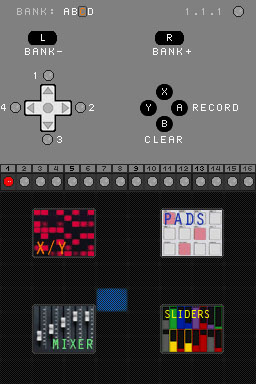
Kaoss-pad mode :


Pads mode :

Mixer mode :

Sliders mode :

vendredi 6 mai 2011
mardi 26 avril 2011
dimanche 3 avril 2011
dimanche 27 mars 2011
Chaos
Here's a look at the bottom screen displaying kaoss pad bricks. Some testing I'm doing with the display.
samedi 26 mars 2011
Back on track

With the Nintendo 3DS coming, I'm going to have a DS again, and I will be able to work on MidiControl DS. I started already, actually. This time, I'm not using PALib, just the libNDS, and of course, the libDSMI. I will use C++ instead of C. This implies making everything from scratch again, so don't expect to see anything anytime soon !
It won't be a simple re-coding of the first MidiControl DS, I'm working on adding some nice features, the first being midi feedback, so that when you change a parameter on the computer, it will be updated on the DS aswell.
As soon as I get my 3DS, I will make some tutorial videos, now that I have a correct camera.
In the meantime, you can still download MidiControl DS 1.0b at Filetrip :
http://filetrip.net/f9809-MIDIControlDS-1-0b.html
jeudi 10 février 2011
Akai APC20 Custom Remote Script for Ableton Live

I just got an APC20 for Ableton Live, and it works like a charm... However, I was quite upset about a particular point in its functionnalities. You can switch between eight modes for the 8 sliders, for controlling either Volume, Send A, B or C, or 3 User banks for assigning to whichever parameter you want. This is great, but to switch between a mode, you have to press the Shift button and then the corresponding button on the "Record Arm" row.
This is not perfect when you use the APC for a live set, where you're not likely to use the Record Arm buttons, but you're much more likely to have to switch a lot between parameters. Plus, you have to press Shift to see in what mode you are. That's not great at all.
I tried searching on the net if someone had already thought the same thing, and if solutions existed, but there was none. I then thought it would never be possible, since this was probably handled hardware-side... Until a nice guy at the Ableton forums replied and said that it was handled software side, by the MIDI Remote Script. This same guy runs a great blog about that subject, and he provided the sources for the Ableton Live 8.1.3 APC remote scripts.
I then changed a couple of lines in the corresponding python source file, and voilà !
You can download that version here :
http://www.mediafire.com/?b4i6o6ipk9lbb22
You have to put the APC20 folder in Ressources/MIDI Remote Scripts in your Ableton Live instalation folder. I'm using Ableton 8.2 and it's working, I didn't test it on any other version.
Thanks a lot to Hanz Petrov for putting me on the right path.
http://remotescripts.blogspot.com/
As for Midi Control DS, I'm not working on it anymore at the moment, since I don't have a DS anymore, and I don't have enough free time. But if I had time, I'd be glad to work on it again, on more advanced features, such as controlling Ableton Live...
mardi 23 février 2010
MIDIControlDS v1.0 beta
Finally, after a few tough days of fighting with all the libraries and the compiler, the beta is here !
It's got the pads you saw in the previous video, a touchscreen controller like the one of the old MIDIPadDS, only with super cool Kaoss Pad 3 style visual effects.
Last but not least, 8 slider controls. You will learn more in the manual inside the archive, and you can watch these 3 screens, and a lame video (I have a lame camera, sorry)


Download MIDIControlDS v1.0 beta at Filetrip :
http://filetrip.net/f9809-MIDIControlDS-1-0b.html
It's got the pads you saw in the previous video, a touchscreen controller like the one of the old MIDIPadDS, only with super cool Kaoss Pad 3 style visual effects.
Last but not least, 8 slider controls. You will learn more in the manual inside the archive, and you can watch these 3 screens, and a lame video (I have a lame camera, sorry)


Download MIDIControlDS v1.0 beta at Filetrip :
http://filetrip.net/f9809-MIDIControlDS-1-0b.html
mercredi 16 décembre 2009
Oldie
Some of you probably know the ancestor of MIDIControl DS. It was called MIDIPad DS and I released it in 2007. It was just a basic X-Y touchscreen controller, a feature that will be in MIDIControl DS.
You can still download it from Filetrip :
MIDIPad DS 0.1
You will need the DSMI application for your PC or MAC, get it here :
DSMI Server
More explanations on how it works here :
DSMI Documentation
You can still download it from Filetrip :
MIDIPad DS 0.1
You will need the DSMI application for your PC or MAC, get it here :
DSMI Server
More explanations on how it works here :
DSMI Documentation
First post, first news.
First, let me present you MIDIControl DS. This software is a MIDI controller for the Nintendo DS. It features :
- Kaoss Pad-like X-Y touchscreen controls
- 12 MPC-like pads
- 8 faders for mixer control in your DAW
- 8 faders for other controls.
The developpement is pretty advanced, I should have a first full-version to run tests in a few days. The pads section is 99% over, it's got 12 pads with velocity sending NOTE ON and NOTE OFF messages, and a hold function. Here's a screen, and video, but with sound not synced (don't worry it's not a big latency issue of my program, it's an encoding issue).

- Kaoss Pad-like X-Y touchscreen controls
- 12 MPC-like pads
- 8 faders for mixer control in your DAW
- 8 faders for other controls.
The developpement is pretty advanced, I should have a first full-version to run tests in a few days. The pads section is 99% over, it's got 12 pads with velocity sending NOTE ON and NOTE OFF messages, and a hold function. Here's a screen, and video, but with sound not synced (don't worry it's not a big latency issue of my program, it's an encoding issue).

Inscription à :
Articles (Atom)